Saturday, May 18, 2019

#ShowerGems and PLNS

After an exciting 8 weeks learning about all things design (and there will be blogs about it, and how it relates to educational technology), the next class in my program is Digital Communication Educators.  I think the class is going to be a little challenging, especially since it's coming at the end of the school year, but ultimately I hope to learn how to use social media to: a) improve my teaching,  b) help me reach out to other teachers and learn from them and c) strengthen my relationships with my students and their families.

Photo by Evelyn Chong from Pexels
The first thing our professor, Dr. Sarah Thomas, had us do (besides set up accounts on Twitter, Pinterest, Facebook, etc),  was to read an essay she wrote for the book #EduMatch Snapshot in Education 2016 (available through Amazon here), and write a reflection.  A "showergem" is that brillant idea you get while (typically) taking a shower and your mind is thinking of both nothing and everything at the same time.  I haven't had any "showergems" yet, since my mind is more focused on making it through PARCC testing and the end of the school year, but I'm sure that during this course, I'll be "drowning" in showergems!


PLNs, or Personal/Professional Learning Networks, is a concept as old as teaching.  Teachers are always looking for new ideas--whether it's for lesson planning or classroom management-- or just looking for people to share in all the little joys of education today.  In the past, your "network" would be teachers in your content area, or your department/grade level at your school.  Depending on the size of your county, you might meet up once or twice a year with teachers in your content area from different schools.  Or perhaps a colleague transfers to a different school (maybe even a different district *gasp*!), but you keep in touch with them afterwards.  Maybe you would go to a conference and meet up with like-minded professionals, but again, in the past, unless you exchanged phone numbers, having a discussion with colleagues would be difficult.

Photo by Eugene Chystiakov from Pexels
However, with today's technology and the popularity of sites like Twitter, Facebook, and Pinterest, it's easier to find groups of teachers and share ideas.  There are ecommerce websites, such as Teachers Pay Teachers, where teachers can go quickly get ideas (there are some great resources (some free, some for not too much), as well as a blog on a variety of topics and content areas.  Teachers no longer have to work in isolation.  You can quickly search for groups to follow on Twitter, Facebook, LinkedIn, Pinterest, even Instagram!  There will probably be a bit of overlap, since the bigger groups, such as We Are Teachers and Edutopia, tend to use most of the major social media sites.  But, in a sea of information, how do you find people to connect and network with?  This article from the Scholastic site is great for helping you to use Twitter more effectively in searching for people and groups to connect with. We Are Teachers has this helpful article on groups to follow on Facebook, but if you want to search for groups on your own (and aren't quite sure how to do so), Hootsuite has this article to help you.

Why should you form or join a PLN? This post from Teach Thought has some great reasons (and a fantastic infographic from Sylvia Duckworth).  The one that resonates with me the most is:  Make International Connections, especially since I'm a Spanish teacher.  We keep telling the kids that their future is going to be different from the future previous generations could expect, but we're not always exposing them to the international connections that can benefit them.  I'd like to get better at helping my students make international connections.  Hmmm, I'll bet there's a PLN for that!

Schoology, the learning management system that Baltimore County Public Schools uses, also has a helpful blog post about PLNs.  Most relevant reason for me:  Flexibility.  I can find the answers when I need them, not just when my school or county decides to host a professional development.  Professional development is important, but sometimes what my district, or my school wants me to learn isn't the most relevant to my professsional needs.  With a PLN, I can learn about Comprehensible Input, or how to use children's books written in Spanish to support authentic learning, and how to help my students do their best on high stakes standardized tests. (If you're not sure what a LMS is, click here.)

Finding a mentor is another good reason to join a PLN.  Mentors can help even experienced teachers find new methods for teaching, or provide support as they learn about changing technology.  I've been seeing a graphic going around that says that "Teachers do not fear change.  Teachers fear not being supported when asked to change.  There's a big difference."  It's true.  Teachers are willing to learn anything if they think it'll help their students learn more and help them secure their future, but they hate it when they're told to do something with no guidance or support on how to implement it.  Having a mentor, whether in the same school, or online, gives teachers that support.  In addition, a PLN can give teachers a voice in that change, another benefit.

Setting up your PLN will probably be time consuming in the beginning, but once you have it, Schoology recommends spending about 20 minutes a day going through posts, links and articles.  I would also recommend keeping some kind of online notebook for articles, links, and resources.  There's nothing more frustrating than knowing you just read something about a topic, and then can't find it later!

So, there you have it, some ideas about PLNs and why they can be important for teachers today.  Even better, it shows an interesection of tech and classrooms.  Now, excuse me while I go research groups to help me in my quest to improve my teaching!


Thursday, March 7, 2019

Pedadgogy + Content + SAMR = TPACK Magic!

It All Adds Up:  An Example of Using SAMR and TPACK in the English/Language Arts Classroom to Teach Creative Writing


But First, a Quick Look at Pedagogy...Learning Theories that Help Inform Instruction 

If you Google "pedagogy," this is the definition that pops up:
  
   ped·a·go·gy

Dictionary result for pedagogy

/ˈpedəˌɡäjē/
noun
  1. the method and practice of teaching, especially as an academic subject or theoretical concept.

    "the relationship between applied linguistics and language pedagogy"

So, the pedagogical theory that a teacher adopts shapes the methods and best practices a teacher uses to deliver instruction.  A quick rundown of the five most common pedagogies taught in Teacher Education Programs are:

 Behaviorism:  As you might expect, this theory posits that people are blank slates (tabula rasa), and that how they behave can be influenced positively or negatively by external stimuli.  Want your students to sit quietly?  Give a positive reward to those who are sitting quietly, and give a negative reward to those who aren't.  Positively reward students who are getting good grades, and negatively reward those who aren't. Ideally, students will start to exhibit the behaviors that give them positive rewards, and abandon those  behaviors that don't.

Cognitivism:  As the name suggests, the mind is the motivator in this learning theory.  People are rational beings who need to be active participants in their learning.  The mind is often compared to a computer:  information comes in, is processed, and leads to certain outcomes.  I think it won't surprise anyone to find out that this theory was becoming popular as computers were becoming more valuable to science.

Constructivism:  Students construct their learning based on their personal experiences.  Students make sense of what they're learning by connecting it to what they have already learned, either in school or through experience.  It's important to connect what you want to teach to what a student already knows.

Critical Learning Theory (Pedagogy of the Oppressed):  Educators and educands (a term coined to replace "student") can both learn from each other.  The danger in education is that it can be used to keep a caste system in place, if both educators and educands don't think critically about what is being taught, and why it's being taught.  Education should be a way to eliminate barriers to opportunities, not keep opportunity only for those deemed wealthy or worthy enough.

Social Learning Theory:  People learn best from each other, through observation, imitation, and modelling.  Social interaction can be a powerful way for students to learn.  Students at different levels of learning can work together to bring everyone to an understanding of concepts and skills.

I'm working towards blending Constructivism and Social Learning Theory in my teaching.  I think that students can bring a lot to their education, and I know that even within a novice-level class, you quickly get students at different levels of understanding.  Why not have students reinforce concepts to each other?  I also like to keep the Critical Learning Theory in the forefront of my mind, to keep myself from falling into the trap of thinking I'm all-knowing, and only I can deliver the content.


Now that we have that out of the way, how do we use TPACK and SAMR to teach creative writing?


Although I teach Spanish, I think that creative writing is one of the ultimate collaborative tasks--the writer might be alone as they write the story, but they have to keep their audience in mind--who are the people they want reading their story?  Plus, I hope that a writer involves beta readers (those people who read a story as it's being written, or just after it's been written to make sure that the story makes sense), proofreaders (people who check for spelling, word choice, grammar, and typographical errors), and editors (those who read stories and make suggestions for revision to make the story more appealing to the reader).  Plus, there are so many tech tools out there for all sorts of (ahem) creative teaching.

SUBSTITUTION

You know all those worksheets you give your students to fill out for character development, plot/rising action/resolution, etc?  Even if you give your students a folder to put them in, what usually happens?  "[Teacher], I lost my worksheet!  I can't remember what was supposed to go next!"  Instead of handing out worksheets, why not create a document, using GoogleDocs, MS Word, or Pages (Apple's word processing program).  Students can create a folder on their devices desktop to keep them all, they can be uploaded to you for review, or even shared to another student for peer review.  You save time and trees and students won't be as frustrated when they can't find the paper they need.

Another good substitution tool for a story map is Read-Write-Think's Cube Creator.  I used the Trading Card creator last year, and it was a little tricky sharing and saving it, but my students last year seemed to like it.  (The Trading Card Creator could also be good to use for character creation.)

Word clouds, such as TagxedoWordle, and Wordsift, can be used as brainstorming tools.  Post a link to a word cloud, and have students suggest ideas.  Maybe you want to review the elements of a story, or positive (or negative) character traits.  The more a word is used, the bigger it appears in the cloud.

Mindmapping tools, such as Bubbl.us, can be used for character development, plotting, designing the elements of a story, or anything else you can think of in the pre-writing phase.

AUGMENTATION

I'm going to suggest using a word cloud as an editing tool--have students copy and paste a selection from their story to check if they're overusing a word.  I have a lot of author friends, and a lot of teacher friends, and even a few author-friends-who-are-also-teacher-friends on Facebook and sometimes links for overused words ("Don't use very, use ___") are posted.  I thought using a word cloud to check for those overused words might be a quick, easy editing tool.  Students could then be referred to an online thesaurus (substitution tool) to find a better word.


Pic-Lits, in their own words, is "on-line version of refrigerator poetry makers."  Depending on what kind of creative writing you wanted your students to do, this could be a quick way to get the creative juices flowing, or it could be used to create haiku, or poetry.  Students can either drag-and-drop from word lists (could also be a way to expand vocabulary), or they can "freewrite."

MODIFICATION


PowerPoint, or any other "slideshow" presentation tool (such as Google Slides, or Canva) can be used either as an augmentation, or  as a modification tool.  If all students do is add pictures to their text, and use the transitions and animations, then this would be an augmentation.  However, if they embed video to go with their text, or add background music to their presentation, that would kick it up to a modification.

Make Beliefs Comix is an on-line comic strip maker.  Students can create multi-panel comic strips, using the site's "cast of characters," backgrounds, and objects to tell their story.  Could also be used as as storyboards for a longer story.

REDEFINITION

Wixie is an authoring tool.  (BCPS has a site license, but anyone can use it--for a fee)  Students can create presentations through "their writing, their voice, and their art."

Another way to redefine their creative writing is to have students create videos of their stories.  Most computers have some kind of movie making program.  Students could also collaborate to bring their stories to life--acting, directing, costume-making, music!  Or students could use the movie maker to make a book trailer for their story.

What is SAMR, and How do I Use it to Deliver Technology to My Students

Models of Technology/Curriculum Integration

There are three models of technology/curriculum integration that most educators are familiar with:  SAMR (Substitution, Augmentation, Modification, and Redefinition) TIM (Technology Integration Matrix), and LoTI (Levels of Teaching Innovation). (**Because this is for a class, and not just for my blog, I'm going to focus on SAMR.  I hope to revisit this and do entries on TIM, and LoTI at some point.  If you want to look at TIM, here is the link to the University of South Florida website.  If you're curious about LoTI, here is a link to the LoTI website.)

What is SAMR?

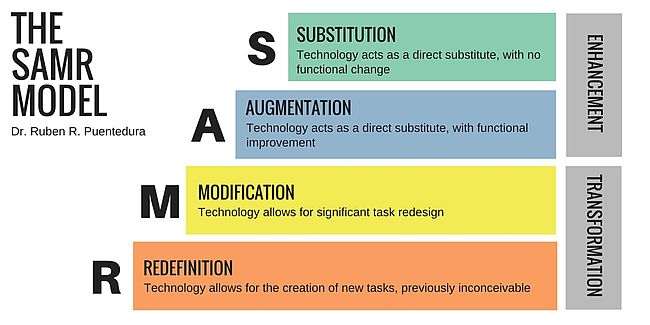
SAMR is a technology integration model,  developed by Dr. Ruben R. Puentedura, of Williams College (MA), in 2010, "to help guide teachers to in effectively integrating technology in classrooms. (Williams College website:  https://learning-in-action.williams.edu/archives/elementary-outreach/ipad-initiative/reuben-puentedura/)


The SAMR Model.jpg
From the Wikiversity website
https://en.wikiversity.org/wiki/Instructional_design/SAMR_Model/What_is_the_SAMR_Model%3F

SAMR and a Cup of Coffee

  One of the best analogies I found to explain SAMR is from Tim Holt's Tumblr and it goes a little like this:  Substitution is like going to Starbuck's and getting a plain cup of coffee from them, instead of making it yourself.  Augmentation would be going to Starbuck's and having them add something to the coffee--maybe ice, maybe a dollop of caramel.  Still a cup of coffee, and you probably could do it yourself.  Modification would be going to Starbuck's and getting a Caramel Macchiato--the coffee is now transformed.  It's no longer a basic coffee that we could easily make ourselves.  Redefinition would be like getting a Starbuck's Pumpkin Spice Latte.  They have a trademark on their recipe, so you can only truly get one at Starbuck's.


SAMR in the Classroom

I think what makes technology scary for teachers sometimes is the thought that we should be using technology at the Redefinition level with every learning activity.  No, not at all.  While I would encourage teachers to incorporate technology use in their lessons, sometimes the most appropriate use of technology is at the Substitution level--having students fill in a form through MS Word or Google Docs, instead of filling out a worksheet.  You might Augment by having students listen to an ebook while they read along.  Modification might be to have students write a blog about a book they've read so that others not necessarily involved in their school can comment on their content.  Redefinition would be to have students create a multimedia presentation, like a book trailer, for the book they've read.

The Marriage of TPACK and SAMR

We can use TPACK and SAMR when we're lesson planning to reflect on what is the best tech solution to teach a skill or concept.  Based on the pedagogy you believe implements content best, what tech tool will deliver it?  What do you want students to be able to do with the content?  What tech tool will help them achieve that goal?  Do you only need to substitute or augment what students already know how to do?  How can students use technology to go beyond the minimum requirements of the task presented?  Keeping this in mind as you lesson plan will help you effectively use technology in your classroom.

This video, by the North Carolina Virtual Public School, does a good job explaining how TPACK and SAMR can work together to improve instruction.


Next blog:  Using Technology in the English/Language Arts Classroom

Thursday, February 28, 2019

TPACK in the Classroom

TPACK?  What's that?

TPACK is an educational acronym that stands for Technological, Pedagogical and Content Knowledge.  Many of us have seen a graphic that looks like this:


Image result for tpack model
Reproduced by permission of the publisher, © 2012 by tpack.org


But, what does it mean, and how does it affect the classroom?

A few definitions:

Technological Knowledge:  how familiar a teacher is in using technology--be it 1:1 devices, programs, or "good ol' fashioned" paper and pencil.

Content Knowledge: What we teach--Foreign language, Social Studies, Math, Science, English, etc.

Pedagogical Knowledge:  how we teach-- our best practices, assessments and learning theories

In addition, there are intersections

Technological and Content Knowledge (TCK):  how well a teacher knows how to use technology to deliver content to their students.  An English teacher might show a livestream of the Royal Shakespeare Company performing one of Shakespeare's plays.  An art teacher might have their students take a virtual tour of the Louvre.  

Pedagogical and Content Knowledge (PCK):  how a teacher designs a lesson for maximum student engagement.

Technological and Pedagogical Knowledge (TPK):  how a teacher can use technology to support a student's learning style according to best practices, or a teacher's philosophy of education.

Therefore, the ultimate intersection would be Technological, Pedagogical and Content Knowledge


The circle surrounding "TPACK" is Context, a fairly recent addition to the TPACK model.  I like to think of it as "who do you teach?"  How an elementary teacher teaches social studies is going to be different from a high school teacher.  More than that, an AP American History teacher would teach that same course differently to "standard" students.  Context can also be how culturally responsive technology use is--does using the technology promote equity in the classroom?  Does it help students overcome barriers to education?

TL:DR (Too Long:  Didn't Read)? 😉   Here are a couple of videos I found that do a nice job of explaining TPACK:


This is the "highlights" version:


 Want a more in depth explanation? Click on the video below:


Want to do some reading on your own?  Yeah, I've got articles for you. 😉

From the BCPS Office of Digital Learning:  Instructional Activities (TPACK explained)

From the Schoology blog:  The TPACK Framework Explained

From the TPACK.org website:  TPACK Explained  (Click on  "What is TPACK?" on the banner)

and from Australia:  What is TPACK? Teaching Teachers for the Future

This is just a small sample of what's out there.  Googling "TPACK" brings up more than 10 pages of links.  And searching YouTube has videos in several languages.

But what about the classroom?  How do I bring TPACK into it?

In the beginning, it's going to require thought.  Why do you want to use the technology (and here, I'm referring to websites or programs you--or your school/district--have found or purchased)?  How will it be used?  What activity will it replace?  Does it do a better job helping the students understand a concept?  Using technology for the sake of using technology may not bring about the results you're hoping for if you don't do your planning.  There is a lot of technology out there, and it can be hard to find exactly what you're looking for.

One great resource for tech resources is the Baltimore County Public Schools Office of Digital Learning Toolbox Index.  In addition, they also have resources broken down by P21 Skills and Tools
(If you're not a BCPS teacher, check out the resources your county/district has available for you.)

Want to read a long journal article about learning activity taxonomies?  The Journal of  Technology and Teacher Education has an article by Harris, Hofer, Schmidt, Blanchard, Young, Grandgenett and Van Olphen called "Grounded" Technology Integration: Instructional Planning Using Curriculum-Based Activity Type Taxonomies

Of course, YouTube has tons of ideas and tutorials, as well as TedTalks about using Technology in the Classroom.  Just type in "Technology in the Classroom," and you'll get more ideas than you probably have time for.

Next blog:  SAMR in the Classroom

Saturday, February 23, 2019

Why this blog

They say you can't teach an old dog new tricks.... well, be that as it may, this middle-aged teacher is learning something new...I'm working on a Master's in Educational Technology through Loyola University in Maryland (link is for Loyola in general, not necessarily the program.  Hey, I'm still learning stuff!)

Sometimes, I have to create things for class, so I thought I'd go ahead and set up a blog.  Other times, I might learn something and want to remember what it is I learned and why I thought it was so neat.  Then again, I might want to share information with my fellow teachers, whether you teach with me in my school, in my content area, my county, or in the world.

If you've stumbled on this blog somehow, please know that I'm not promising regular updates.  This could change as I progress in my studies, and as I start using technology in my classroom--or I may create a grand total of 10 blogs and abandon it like some many others do.

So, who am I?

After being a stay-at-home mom and elementary/middle school substitute teacher, I decided a few years ago it was time to get back into my own classroom.  Plus, I had a child just about ready to go to college.  Gotta help out with tuition somehow!

I'm a Spanish (grade) 6 and 7 teacher, at least this year.  Last year, we called it Spanish 1, and I taught a few 6th graders, mostly 7th graders, and a class of 8th graders.  Oh, and I also taught World History to 7th graders.  This year, it's all Spanish.  I teach at Woodlawn Middle School in Baltimore County, Maryland.  As most middle school teachers will tell you, my students are that curious mix of frustrating and funny.  They're transitioning--no longer "little" kids, but not old enough to be young adults--no matter how desperate some of them are to be adults.  (Stay little for a bit longer, kiddos.  The adult world isn't what you think it is.)

Why a new Master's?

A couple of reasons, one being that in order to keep my teacher certificate, I have to take classes any way--why not get another degree out of it?  (Plus, prosaically, I can earn more money if I have at least 30 more credit hours.  See helping to pay tuition note above.)

The other reason is that teachers are being given tech tools, but we're not always shown how to use the tools to make our teaching better.  I'm expecting that by the time I finish this program, I'll know how to use these tech tools in ways to help my students become more proficient in their learning, and maybe even be able to help my fellow teachers transform their analog classrooms into digital classrooms.

Lastly, I suspect that in the next decade, our school calendars are going to change.  With most families able to access the Internet, students won't necessarily be tied to the school building.  Oh, it's snowing out?  No need to have a snow day--students can access lessons and be engaged in learning activities at home.  Going on vacation?  Your student won't come back to school and struggle to keep up with learning that occurred while he was away, and face a mountain of make-up work to be completed within a week.  Your student instead will be able to log into their school account and access the work their classmates are doing while he's away.  Teachers and students will be able to lessen the effect of "Summer Drain" by creating lessons that will help students review work done over the last school year, as well as prepare them for what they'll be learning in the new school year.


Additionally, I think that learning doesn't have to always happen in a classroom.  Sure, if you want (or need) to have the degree, community college, traditional 4 year college/university is the only way to go, but you can teach yourself anything.  With all the ways we have of connecting with people, you can find someone to help you learn a new skill or subject.  Or find a series of videos.  There are many places with online courses.

So, welcome to my blog, and join me on my voyage of eDiscovery.  😄


#ShowerGems and PLNS

After an exciting 8 weeks learning about all things design (and there will be blogs about it, and how it relates to educational technology),...